Printers::Panasonic::HP::Sony::Hitachi::Canon::: HP
Showing posts with label HP. Show all posts

Sunday, 12 April 2020

Driver of HP Color Laser MFP 179fnw Printer

00:04 0
Driver of HP Color Laser MFP 179fnw Printer

HP Color Laser MFP 179fnw Printer is a good Color laser MFP  printer with performance at an affordable price. This printer is enabled with dynamic security. Only HP Original chip can be used to install cartridges. if cartridges using a non-HP chip may not work on it. 

HP Color Laser MFP 179fnw Printer is very advance printer having Printing, copying, scanning and fax capability. Its wireless capability is Wi-Fi 802.11 b/g/n. 

SOFTWARE INCLUDED Common Installer, V3 Print Driver with Lite SM, TWAIN/WIA Driver, HP MFP Scan, HP LJ Network PC-FAX, OCR program.


Do you need driver of HP Color Laser MFP 179fnw Printer?

Tuesday, 24 March 2020

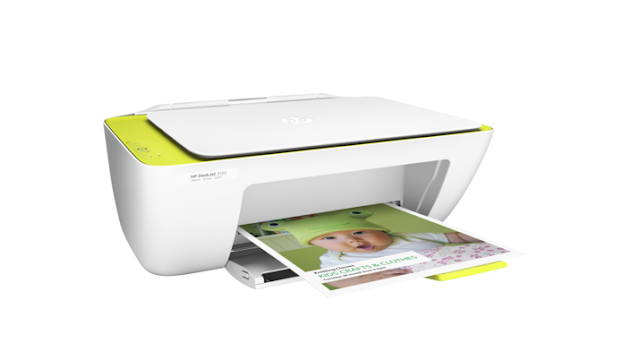
HP DeskJet 2130 Color Printer 3-in-1-Printer-Scan-Copier

05:50 0
HP DeskJet 2130 Color Printer 3-in-1-Printer-Scan-Copier

HP DeskJet 2130 Color Printer 3-in-1(Printer-Scan-Copier) is available in the Market to print, Scan and copy any material of your choice. Its easy to use, connect with USB(2.0) cable with computer and easy to install its software. You can print, scan and copy every day. Everyday printing, scanning and copying is now become easy with an HP DeskJet. 

Save money with optional high-yield ink cartridges. Plus, save space with an all-in-one designed to fit where you need it. Ideal for people who want an affordable. Here is specification of HP DeskJet 2130 Color Printer 3-in-1(Printer-Scan-Copier):-


Specification 

BrandHp
Printer Technology  Inkjet
Connectivity, StandardUSB 2.0
Mobile Printing CapabilityFacility not available
WirelessFacility not available
DisplayFacility not available
Print Speed BlackUnder 10 ppm
Print Speed ColorUnder 10 ppm
Print qualityUp to (4800 x 1200) Optimised dpi colour (when printing from a computer on selected HP photo papers and 1200 input dpi)
Weight7.2 kg
ColorBlack
Warranty01 Year Shop Warranty by the Vendor/ Company

Driver to Download


Download (File Size : 139.6 Mb)

Friday, 29 June 2018

How to Install HP LaserJet Pro M402n-M403

21:20 11
How to Install HP LaserJet Pro M402n-M403


Fast two-sided printing

Breeze through multipage documents with two-sided printing that's faster than the competition. Two-sided printing available on HP LaserJet Pro M402dne and HP LaserJet Pro M402dw.

Fastest first page out

This printer wakes up and prints faster than the competition. This solution software includes everything you need to install your HP printer. This installer is optimized for Windows 8 and newer operating systems.

30% more pages

Get more pages than ever before, using Original HP High-Yield Toner cartridges with JetIntelligence.


Operating Systems:

     Microsoft Windows 10 (32-bit), Microsoft Windows 10 (32-bit), Microsoft Windows 10           (64-bit), Microsoft Windows 8 (32-bit), Microsoft Windows 8 (64-bit), Microsoft Windows       8.1 (32-bit), Microsoft Windows 8.1 (64-bit)
    Driver to Download


How to Install HP Color LaserJet Pro MFP M176n

21:00 0
How to Install HP Color LaserJet Pro MFP M176n
HP Color LaserJet Pro MFP M176n is multiplayer printing machine which can Print, copy, scan. The printer can print out as fast as 16 sec black and white while 27.5 sec for color print. The printer is available in Small Size but having big value with the control made easy. Just start printing, quick and easy—with the simple control panel. Go from zero to the first print out in a matter of seconds. Speed through document tasks. Set the pace for success with an MFP that prints, copies, and scans—fast. All in one, one for all. Easily copy both sides of a two-sided ID or another small document onto the front of a single-page.


Operating Systems
Microsoft Windows 10 (32-bit) (64-bit)
Microsoft Windows 7 (32-bit) (64-bit)
Microsoft Windows 8 (32-bit) (64-bit)
Microsoft Windows 8.1 (32-bit)(64-bit)
Microsoft Windows Vista (32-bit) (64-bit)
Microsoft Windows Xp

Driver to Download

Download (File Size : 100.33Mb)

Monday, 30 April 2018

How to Install HP Laserjet 1010 Printer & Drivers

18:58 0
How to Install HP Laserjet 1010 Printer & Drivers

Installing HP 1010 on Windows 7


HP LaserJet 1010 Printer is often used in offices and home as well but its installation is little tricky. However, It is easy to install HP 1010 on Window 7 but need little technique, so let you know how to install on window 7. No need to search for its drivers or any other software. 


Step No. 1.  Just connect your HP LaserJet 1010 Printer to your Computer through USB Data Cable. 


Step No. 2. Plug the HP LaserJet 1010 Printer with Power Supply. After this, switch it on.

Step No. 3. Click on the Orb button.

Step No. 4.Select “Control Panel.” and click on it.

Step No. 5. Click on “Add a Printer.” 

Step No. 6. Choose “Add a Local Printer.” 


Step No. 7. Select “Use an existing port.” After this,  The drop-down list will appear. Then select DOT4_001 from the options.

Step No. 8. Then select HP from the list of manufacturers. Just select HP LaserJet 3055 PCL5 under the list of printers.


Step No. 9. Now Select the driver that is currently installed. Then click on Next.

Step No. 10. Rename your Printer as HP LaserJet 1010 Printer.

Step No. 11.  Share the printer if you want or leave it. Choose whether to set it as the default printer.

Step No. 12. Click on Finish button. Now Congratulations!!! you have successfully installed the printer. 


Installing HP 1010 on Windows 10


In order to install the HP LaserJet 1010 Printer, Just watch the video below. Same procedure.

Monday, 1 January 2018

Drivers and Software of HP LaserJet Pro M201dw

08:37 0
Drivers and Software of HP LaserJet Pro M201dw

Key Features

  • Print only.
  • Print speed letter: Up to 26 ppm (black).
  • Auto duplex printing; 250-sheet input tray.
  • High yield toner available.

Specifications

Functions
Print
First Page Out (Ready) Black
As Fast as 8 sec
Resolution (Black)
Up to 1200 x 1200 dpi
Monthly Duty Cycle
Up to 15,000 Pages
Recommended Monthly Page Volume
250 to 2000
Print Technology
Laser
Display
196 x 34 pixel Graphic LCD
Processor speed
750 MHz

Download Drivers and Software Printer HP LaserJet Pro M201dw

Click to on Download


Tuesday, 27 December 2016

Printers Drivers HP3500, HP Laser Jet 1020, HP LJ1160

23:04 0
Printers Drivers HP3500, HP Laser Jet 1020, HP LJ1160
HP3500 Printer


Drive production efficiencies for increased production capacity and reduced costs. High image quality at speed. Highly unattended printing ideal for overnight printing.

Please click on link to download driver
Hp3500deskjet.rar


HP LaserJet 1020

HP LaserJet 1020 Drivers is a packet compatible with Windows XP, Windows Vista, Windows 7, Windows 8 and Windows 8.1. 

Please click on link to download driver
HP Laser Jet 1020.rar


HP Deskjet 1010 Printer


  1. Draft mode resolution: 300 x 300 dots per inch (dpi)
  2. Normal mode resolution: 600 x 300 dpi
  3. Plain-Best mode resolution: 600 x 600 dpi
  4. Photo-Best mode resolution: 600 x 600 dpi
  5. Max DPI mode resolution: 1200 x 1200 dpi
  6. First page out 19 seconds
  7. Print method: Drop-on-demand thermal inkjet
  8. Device languages: PCL3 GUI
  9. Print speed: Print speeds vary according to the complexity of the document
Please click on link to download driver
HP LaserJet P1010.iso


HP LaserJet 1160 Printer


 1) The product was tested in a typical configuration with Hewlett-Packard Personal Computer Systems.

2) This Device complies with Part 15 of the FCC Rules. The operation is subject to the following two Conditions: (1) this device may not cause harmful interference, and (2) this device must accept any interference received, including interference that may cause undesired operation.
3) For regulatory purposes, this product is assigned a Regulatory model number. This number should not be confused with the product name or the product number(s).
Please click on link to download driver
HP LJ1160.rar


Saturday, 24 December 2016

HP Envy 5530 e-All-in-One

02:15 5
HP Envy 5530 e-All-in-One
The printer is all weather and loving one. Easy set-up, fast, quiet, lots of options (ie. labels, stock cards) and phenomenal color prints.  This printer can provide quality over the 4500 because it is faster, more memory, and has lots more paper options. No fax capability is fine for my use. Just pointing it out for those who need. I ordered on sale (Staples) for a lean $64.99 with free delivery.Retail is $135.


Dimensions


Width 17.52 inches
Depth 13.15 inches
Height 4.72 inches
Weight 12.27 pounds

Warranty

Product Warranty One-year limited hardware warranty

Specifications

Print Speed (Black and White) 21
pages per minute
Print Speed (Color 17
pages per minute
Maximum Input Capacity 100 sheets
Max Monthly Duty Cycle1,000 pages
Maximum Output Capacity 30 sheets
Vertical Print Resolution (Black and White) 1,200 dpi
Horizontal Print Resolution (Black and White) 600 dpi
Vertical Print Resolution (Color) 4,800 dpi
Horizontal Print Resolution (Color) 1,200 dpi
Max Print Height 11
Max Print Width 8.5
General Information
Operating System Compatibility
Linux
Mac OS
Windows
Energy Star Yes
Memory (standard) 128MB
Touch Screen Display Yes
Display Details 6.74 cm (2.65") CGD (color graphics), touchscreen
Supported Media
Media Sizes Supported
10 Envelope
4 x 6"
5 x 7"
8 x 10"
Legal (8.5 x 14")
Letter (8.5 x 11")
Media Types Supported
Banner (A4 or Letter)
Card Stock
Envelopes
Iron-On Transfers
Labels
Plain Paper
Transparencies
Copy/Scan Specifications
Max Copy Speed (Black and White)
21
copies per minute
Max Copy Number
50
pages
Scanner Media Input Flatbed
Max Copy Speed (Color) 17 copies per minute
Max Copy/Scan Height 11.7
Max Copy/Scan Width 8.5
Vertical Scan Resolution 1,200 dpi
Horizontal Scan Resolution 600 dpi
Scanner bit depth 24 -bit internal
Reduction 25%
Enlargement 400%
Connectivity
Standard Interface(s)
Card Slots/USB Host
USB
USB 2.0
WiFi 802.11 b/g/n
Connectivity
Card Slots/USB Host
USB
Wireless
Features
Printing Features
Auto Document Feeder
Auto Duplex Print
Borderless Printing
Document Printing
Mobile Printing App
Photo Printing
Smartphone Photo Printing
Wireless Printing
Copy Features

Auto Duplex Copy
B/W Copy
Borderless
Color Copy

Thursday, 22 December 2016

HP Color LaserJet Pro MFP M477FDW

06:18 0
HP Color LaserJet Pro MFP M477FDW
The HP Color LaserJet Pro MFP M477fdw  is a small office multifunction printer (MFP) with a compact build, solid speed, very good graphics quality, and a wide range of connection choices. Although comparable laser-class inkjets rival, or even exceed, its speed and undercut its running costs, plenty of people still prefer lasers for their dependability and crisp text and graphics. As such, the M477fdw is an appealing choice for a small office or workgroup with average printing needs. Scan digital files directly to email, USB, network folders, and the cloud with preloaded business apps.


3.    Grab pages and go—without waiting around. This MFP wakes up and prints faster than the competition.1
Breeze through multipage documents with two-sided printing that’s faster than the competition.1
Control access to print jobs and help keep printing safely with security features like LDAP authentication.

Advantages


Fast. Very good graphics quality. PCL and PostScript drivers. Wi-Fi, wireless direct, and NFC connectivity. 50-sheet ADF supports single-pass two-sided scanning.

Features

Speed through tasks. Help keep data protected.
Scan digital files directly to email, USB, network folders, and the cloud with preloaded business apps.3
Grab pages and go—without waiting around. This MFP wakes up and prints faster than the competition.1
Breeze through multipage documents with two-sided printing that’s faster than the competition.1
Control access to print jobs and help keep printing safely with security features like LDAP authentication.

Easy management. Efficient printing.
Easily manage print jobs directly at the MFP—just tap and swipe the 4.3-inch (10.9 cm) touchscreen.6

Easily print Microsoft® Word and PowerPoint® documents—now directly from your USB drive.5
Easily manage devices and settings using HP Web Jetadmin with a suite of essential management features.7

Print using less energy than competitors—enhanced by Original HP Toner cartridges with JetIntelligence.8
More. Pages, Performance, and Protection.
Get the most prints for your money—with Original HP High Yield Color Toner cartridges with 

JetIntelligence.2
Count on professional quality at high speeds with HP ColorSphere 3 toner.
Help ensure you’re getting the authentic HP quality you paid for with innovative anti-fraud technology.
Print right away with preinstalled toner cartridges. Replace them with optional high-yield cartridges.
Stay connected with easy mobile printing options.
Easily print from a variety of smartphones and tablets—generally, no setup or apps required.9
Count on wireless direct printing in the office—from mobile devices—without accessing the company network.11
Help workers print with just a touch of their NFC-enabled mobile device to the printer—no network needed.12

Easily access, print, and share resources with Ethernet and wireless networking.10
Related links
Data Sheets / Documents
Technical Support / Manuals

Product specifications

HP Data Sheet

Functions

Print, copy, scan, fax, email

First page out (ready) black

As fast as 8.9 sec

First page out (ready) color

As fast as 9.8 sec

Resolution (black)

600 x 600 dpi, Up to 38,400 x 600 enhanced dpi

Resolution (color)

600 x 600 dpi, Up to 38,400 x 600 enhanced dpi

Resolution technology

HP ImageREt 3600, PANTONE® calibrated

Monthly duty cycle

Up to 50,000 pages

Recommended monthly page volume

750 to 4,000

Print Technology

Laser

Display

4.3" intuitive touchscreen Color Graphic Display (CGD)

Processor speed

1200 MHz

Number of print cartridges

4 (1 each black, cyan, magenta, yellow)

Replacement cartridges

HP 410A Black LaserJet Toner Cartridge (~2300 pages) CF410A; HP 410X Black LaserJet Toner Cartridge (~6500 pages) CF410X; HP 410A Cyan LaserJet Toner Cartridge (~2300 pages) CF411A; HP 410X Cyan LaserJet Toner Cartridge (~5000 pages) CF411X; HP 410A Yellow LaserJet Toner Cartridge (~2300 pages) CF412A; HP 410X Yellow LaserJet Toner Cartridge (~5000 pages) CF412X; HP 410A Magenta LaserJet Toner Cartridge (~2300 pages) CF413A; HP 410X Magenta LaserJet Toner Cartridge (~5000 pages) CF413X

Print languages

HP PCL 6, HP PCL 5c, HP postscript level 3 emulation, PCLm, PDF, URF, Native Office

Automatic paper sensor

No

Paper trays, standard

2

Paper trays, maximum

3

Mobile Printing Capability

HP ePrint; Apple AirPrint™; Mopria™-certified; NFC Touch-to-print; Wireless Direct Printing; Google Cloud Print 2.0; Mobile Apps

Connectivity, standard

Hi-Speed USB 2.0 port; built-in Gigabit Ethernet 10/100/1000 Base-TX network port; Easy-access USB

Network ready

Standard (built-in Gigabit Ethernet, Wi-Fi)

Ports

1 Hi-Speed USB 2.0; 1 Gigabit Ethernet 10/100/1000 Base-TX; 1 Easy-access USB

Security management

Embedded Web Server: password-protection, secure browsing via SSL/TLS; Network: enable/disable network ports and features, SNMPv1 & SNMPv2 community password change; HP ePrint: HTTPS with certificate validation, HTTP Basic Access Authentication, SASL authentication; LDAP authentication and authorization; Firewall and ACL; SNMPv3, 802.1X, Secure Boot, authentication via WEP, WPA/WPA2 Personal, WPA2 Enterprise; encryption via AES or TKIP

Minimum system requirements

Windows XP (SP2) (32-bit) or newer, 233 MHz processor or higher, 512 MB RAM, 400 MB HD space, CD-ROM or the Internet, USB or Network connection
OSX 10.7 or newer; Internet; USB or Network connection; 1 GB HD space

Compatible operating systems

Windows OS compatible with In-Box Driver; Windows XP SP3 all 32-bit editions (XP Home, XP Pro, etc.); Windows Vista all 32-bit editions (Home Basic, Premium, Professional, etc.); Windows 7 all 32- & 64-bit editions; Windows 8/8.1 all 32- & 64-bit editions (excluding RT OS for Tablets); Windows 10 all 32- & 64-bit editions (excluding RT OS for Tablets); Windows OS compatible with Universal Print Driver (From http://www.HP.com); Windows XP SP3 32- & 64-bit editions (XP Home, XP Pro, etc.); Windows Vista all 32- & 64-bit editions (Home Basic, Premium, Professional, etc.); Windows 7 all 32- & 64-bit editions; Windows 8/8.1 all 32- & 64-bit editions (excluding RT OS for Tablets); Windows 10 all 32- & 64-bit editions (excluding RT OS for Tablets); Mac OS (HP Print Drivers available from HP.com and Apple Store); OS X 10.7 Lion; OS X 10.8 Mountain Lion; OS X 10.9 Mavericks; OS X 10.10 Yosemite; Mobile OS (In-OS drivers); iOS, Android, Windows 8/8.1/10 RT; Linux OS (In-OS HPLIP; SUSE Linux (12.2, 12.3, 13.1); Fedora (17, 18, 19, 20); Linux Mint (13, 14, 15, 16, 17); Boss (3.0, 5.0); Ubuntu (10.04, 11.10, 12.04, 12.10, 13.04, 13.10, 14.04, 14.10); Debian (6.0.x, 7.x); Other OS; UNIX

Memory, standard

256 MB NAND Flash, 256 MB DRAM

Memory, maximum

256 MB NAND Flash, 256 MB DRAM

Printer management

Printer Administrator Resource Kit (Driver Configuration Utility, Driver Deployment Utility, Managed Printing Administrator); HP Web Jetadmin Software; HP Proxy Agent Software; HP Imaging and Printing Security Center; HP Utility (Mac); HP Device Toolbox (Win 7)

Supported network protocols

TCP/IP, IPv4, IPv6; Print: TCP-IP port 9100 Direct Mode, LPD (raw queue support only), Web Services Printing, HP ePrint, Apple AirPrint™, Google Cloud Print 2.0, Moria, FTP Print, IPP Print; Discovery: SLP, Bonjour, Web Services Discovery; IP Config: IPv4 (BootP, DHCP, AutoIP, Manual), IPv6 (Stateless Link-Local and via Router, Statefull via DHCPv6), SSL Security and Certificate management; Management: SNMPv1, SNMPv2, SNMPv3, HTTP/HTTPS, Syslog, FTP FW Download

Paper handling input, standard

50-sheet multipurpose tray, 250-sheet input tray, 50-sheet Automatic Document Feeder (ADF)

Paper handling output, standard

150-sheet output bin

Duplex printing

Automatic (standard)

Envelope input capacity

Up to 15 envelopes

Finished output handling

Sheetfed

Media sizes supported

Tray 1, Tray 2: A4, A5, A6, B5 (JIS), B6 (JIS), 16K (195 x 270 mm, 184 x 260 mm, 197 x 273 mm), 10 x 15 cm, Oficio (216 x 340 mm), postcards (JIS single, JIS double), envelopes (DL, C5, B5); Optional Tray 3: A4, A5, A6, B5 (JIS), B6 (JIS), 16K (195 x 270 mm, 184 x 260 mm, 197 x 273 mm), 10 x 15 cm, Oficio (216 x 340 mm), postcards (JIS single, JIS double); Automatic duplexer: A4, B5, 16K (195 x 270 mm, 184 x 260 mm, 197 x 273 mm), Oficio (216 x 340 mm)

Media sizes, custom

Tray 1: 3 x 5 to 8.5 x 14 in; Tray 2, optional Tray 3: 3.94 x 5.83 to 8.5 x 14 in

Media types

Paper (bond, brochure, colored, glossy, letterhead, photo, plain, preprinted, pre-punched, recycled, rough), postcards, labels, envelopes

Supported media weight

Tray 1: 16 to 47 lb (up to 52 lb with HP Color laser glossy photo papers); Tray 2: 16 to 43 lb (up to 47 lb with postcards, up to 52 lb with HP Color laser glossy photo papers); optional Tray 3: 16 to 43 lb (up to 47 lb with postcards, up to 40 lb with HP Color laser glossy photo papers); Automatic duplexer: 16 to 43 lb

Media weights by paper path

Tray 1: 60 to 176 g/m² (up to 200 g/m² with postcards and HP Color laser glossy photo papers); Tray 2: 60 to 163 g/m² (up to 176 g/m² with postcards, up to 200 g/m² HP Color laser glossy photo papers): optional Tray 3: 60 to 163 g/m² (up to 176 g/m² with postcards, up to 150 g/m² Glossy media); Automatic duplexer: 60 to 163 g/m²

Power

110-volt input voltage: 110 to 127 VAC (+/- 10%), 60 Hz (+/- 3 Hz)

Print speed, black (normal)

Up to 28 ppm

Power consumption

570 watts (Active Printing), 18.6 watts (Ready), 2.5 watts (Sleep), 0.6 watts (Auto-On/Auto-Off, via USB connectivity), 0.05 watts (Shutdown or Off)

Energy efficiency

ENERGY STAR® certified; Blue Angel; EPEAT® Silver

Operating temperature range

59 to 86°F

Operating humidity range

20 to 70% RH (non-condensing)

Dimensions (W X D X H)

16.4 x 18.6 x 15.7 in

Dimensions Maximum (W X D X H)

16.8 x 25.7 x 16.3 in

Weight

51.2 lb

Package weight

59.1 lb

What's in the box

Printer; 4 preinstalled starter HP LaserJet toner cartridges (Black: ~2300 pages, CYM: ~1200 pages); In-box documentation (Getting Started Guide, Install Poster); Software drivers and documentation on CD-ROM; Power cord; USB cable; Built-in duplexer; Built-in fax

Print speed, color (normal)

Up to 28 ppm

Cable included

Yes, 1 USB cable

Warranty

One-year limited hardware warranty

Software included

For Windows OS: HP Software Installer/Uninstaller, HP PCL 6 Printer Driver, HP Device Experience (DXP), HP Send Fax, HP Device Toolbox, HP Fax Print Driver, HP Fax Setup Wizard, HP Product Improvement Study, HP Scan App and Drivers, Scan to e-mail setup Wizard, Scan to Folder Setup Wizard, HP Update,Product Registration Assist,HP Web Services Assist (HP Connected),Online user manuals,(*software varies by OS: WinXP/Vista = driver only; Win 7 = full solution; Win 8+ and newer = drivers only with more apps available in MS App store) For Mac OS, Welcome Screen, (Directs users to HP.com or OS App Source for LaserJet Software)